


Download ControlPad – Portable Numpad Shortcut Tool for Windows, Mac & Android
ControlPad is a lightweight, portable utility that transforms your keyboard’s numpad into a powerful command launcher. With just a few keystrokes, you can launch your favorite applications, scripts, or system tools using customizable three-digit codes. Designed for power users and productivity enthusiasts, ControlPad runs directly from a USB drive—no installation required.
It’s ideal for anyone looking to speed up their workflow, especially those who frequently use the numpad. The software features a minimal system tray interface, customizable activation delays, and supports both GUI and manual configuration via a simple text file. Whether you're on Windows, Mac, or Android, ControlPad delivers fast, secure, and efficient access to your digital tools.
Download ControlPad today and take control of your keyboard like never before.
Advanced Keyboard Automation with ControlPad
ControlPad redefines how you interact with your computer by turning your numpad into a dynamic shortcut hub. Instead of navigating through menus or typing long file paths, you can launch any application with a simple three-digit code. For example, typing 111 might open your web browser, while 205 could start your code editor. The activation process is intuitive: press and hold the * key for a configurable duration (default is 150ms), then enter your code and press Enter. A quick green indicator confirms a successful match—perfect for visual feedback without distractions. This feature is especially helpful in high-speed workflows where every second counts. One of the standout features is its portability. ControlPad doesn’t require installation, making it perfect for users who switch between multiple devices. Simply copy the executable to a USB drive, plug it into any machine, and run it immediately. No admin rights needed, no registry changes—just instant access. The software is built with efficiency in mind, consuming minimal system resources, so it runs smoothly even on older hardware. Whether you're a developer, designer, or office worker, ControlPad helps you reduce repetitive tasks and boost productivity. The system tray icon provides quick access to settings, but the interface is geared toward advanced users. Don’t let that deter you—once you understand the basics, customizing commands becomes second nature. You can define shortcuts either through the built-in options menu or by editing the plain-text command file directly. The syntax is straightforward:111=C:\Program Files\Mozilla Firefox\firefox.exe. This flexibility allows for deep customization, including launching batch scripts, system utilities, or even remote desktop connections.
Customization, Compatibility & Setup Guide
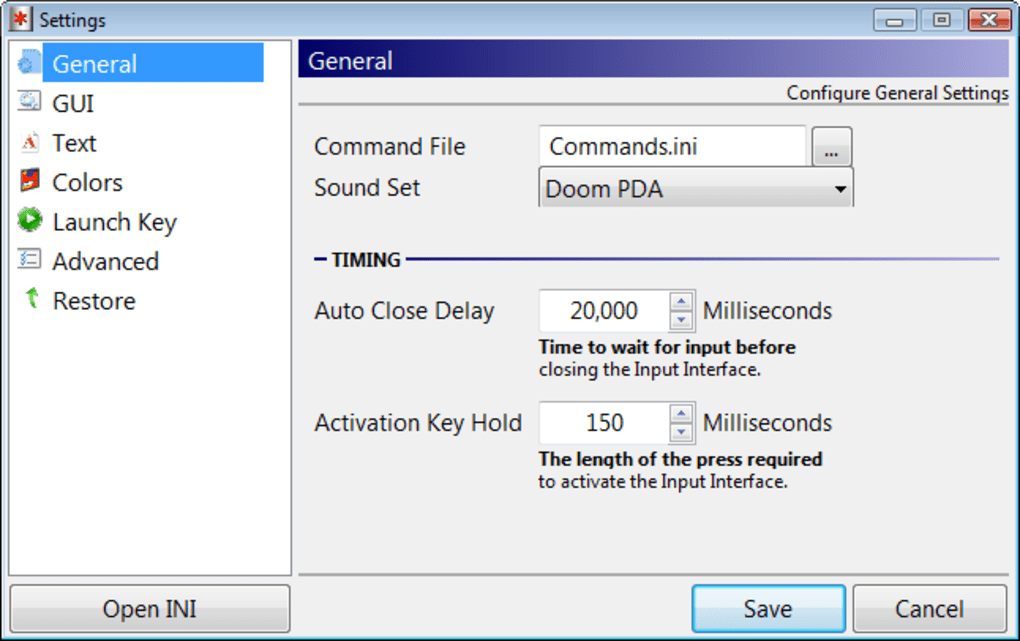
Getting started with ControlPad is simple, even if you’re new to automation tools. First, download the latest version from the official site and extract the files to your preferred location—ideally a USB drive for maximum portability. Run the executable file, and ControlPad will launch silently in the background, adding a small icon to your system tray. From there, you can access the settings panel to adjust activation delay, enable/disable the green confirmation window, or toggle silent mode. For customization, ControlPad offers two methods: the GUI interface and direct file editing. The GUI is functional but assumes familiarity with technical terms like “command mapping” and “numpad monitoring.” If you’re comfortable with these concepts, the interface gives you a clean way to assign codes to applications. However, for advanced users, editing the commands.txt file directly is more efficient. This plain-text file uses a simple key-value format: each line contains a three-digit code followed by an equals sign and the full path to the executable or script. For example:101=C:\Users\John\Documents\BackupScript.bat
102=C:\Program Files\Microsoft Office\root\Office16\WINWORD.EXE
This method allows you to manage dozens of shortcuts in seconds. Be mindful of file paths—especially if using on different machines. Paths like C:\Program Files\ may vary depending on the system, so consider using relative paths or environment variables when possible. ControlPad supports Windows 7 and later, Mac OS X (via compatibility layers), and Android (with a compatible keyboard). While native Mac and Android support is limited, the core functionality remains intact across platforms.
Pros, Cons & Real-World Use Cases
ControlPad shines in scenarios where speed and efficiency are critical. Here’s why it’s a favorite among power users:- Lightweight & Portable: Runs from USB without installation—ideal for shared or restricted machines.
- Fast Launch Speed: Commands execute in milliseconds, perfect for rapid task switching.
- Customizable Activation: Adjust the * key hold time to suit your typing style.
- Minimal System Impact: Uses very little CPU and memory, even when running in the background.
- Text-Based Configuration: Easy to backup, transfer, or share your command list.
- Visual Feedback: Green light confirms correct codes—great for learning and verification.
- Advanced UI: The interface assumes technical knowledge, which may confuse beginners.
- Path Dependency: Custom commands may fail if file paths differ across systems.
- Limited Mobile Support: Android and Mac versions are experimental and not fully optimized.
- No Built-in Search: Finding a specific code requires manual file inspection.
- Requires Numpad: Users without a numeric keypad (like many laptops) can’t use it.
Frequently Asked Questions (FAQ)
- Is ControlPad free to download and use? Yes, ControlPad is completely free to download and use. There are no hidden costs or subscription fees. The portable version is available under a permissive license for personal and professional use.
- Can I use ControlPad on Mac and Android? ControlPad is primarily designed for Windows, but it can run on Mac and Android with some limitations. On Mac, compatibility depends on the OS version and keyboard setup. Android support is experimental and requires a compatible keyboard with a numpad or virtual keypad.
- How do I change the activation delay for the * key? Open the ControlPad settings from the system tray icon. Look for the "Activation Delay" option and adjust the milliseconds (default is 150ms). You can set it as low as 50ms or as high as 500ms based on your typing speed.
- Can I launch batch files or scripts with ControlPad? Absolutely. You can assign any executable, batch file (.bat), PowerShell script (.ps1), or even system commands to a three-digit code. Just ensure the full path is correct and the file is accessible.
- What should I do if my shortcut doesn’t work? First, check the command file for typos in the path. Ensure the file exists at the specified location. If you’re on a different machine, update the path accordingly. Also, verify that the numpad is enabled and the * key is functioning properly.







